7 Common Bank Statement Conversion Mistakes (And How to Avoid Them in 2026)
Avoid these costly bank statement conversion mistakes that waste hours and cause errors. Learn how multi-engine OCR, built-in PDF editing, and disciplined review prevent common failures—without guesswork.
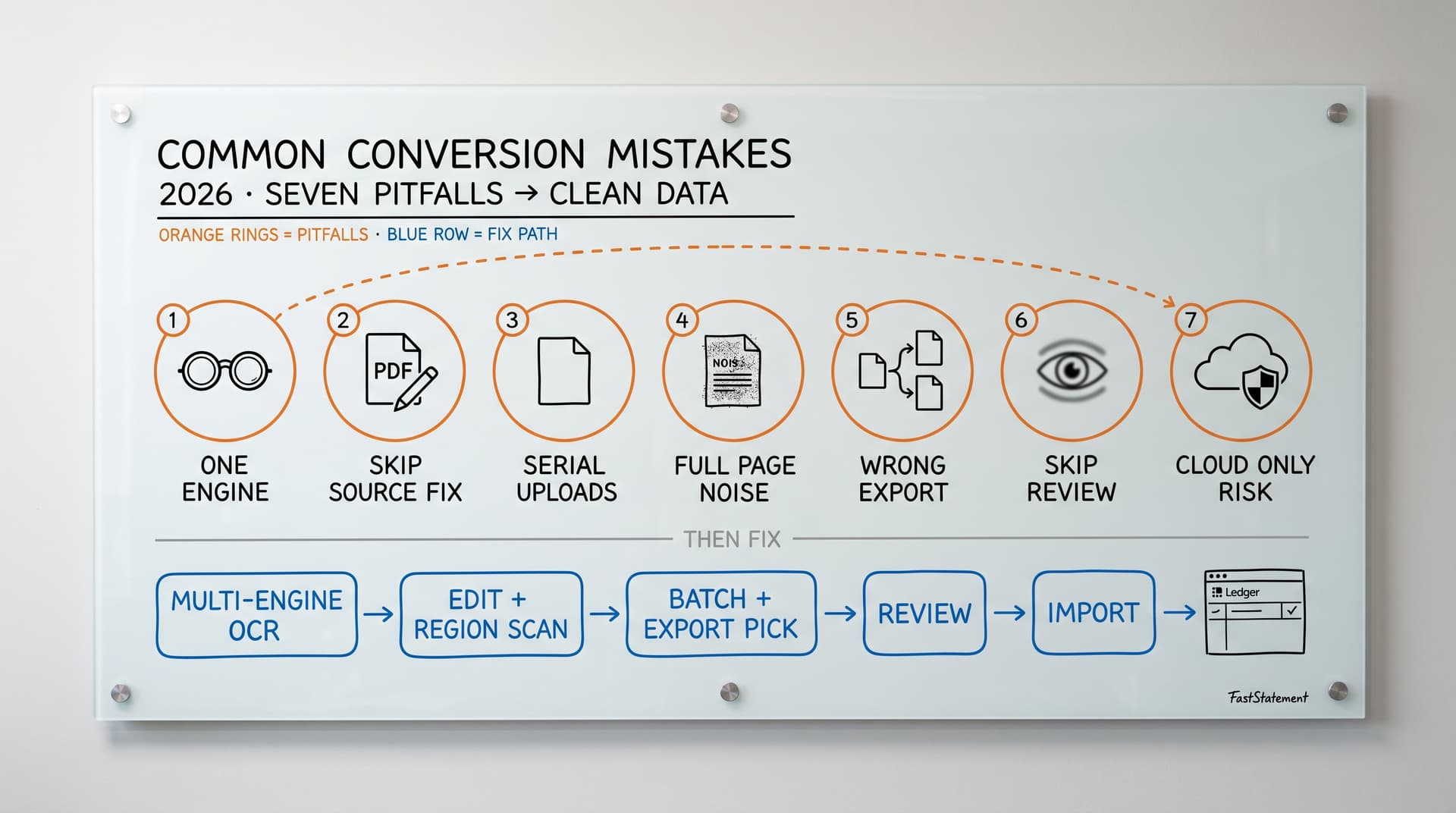
Bank statement conversion looks simple on the surface: upload a PDF, get an Excel or CSV file, and move on. In reality, the same mistakes keep showing up—wasting hours, introducing errors, and forcing you to redo work.
After seeing patterns across thousands of conversions from accountants, bookkeepers, and small businesses, we narrowed it down to seven mistakes that cause most of the pain. This guide shows what those mistakes are, why they hurt, and how to avoid them using better tools and workflows—whether you are closing one client or juggling a dozen.
If you are still shopping for tooling, bookmark how to choose the right bank statement converter in 2026: it lines up cleanly with every fix below.
Who gets burned when these habits stick
Teams feel the sting differently depending on throughput and liability:
- Solo practitioners bleed clock hours redoing brittle CSVs nobody priced into the engagement
- Multi-staff firms suffer version fragmentation—“final-final-v3.xlsx” email chains—as each pass introduces new deltas
- Client-facing accountants absorb trust hits when a subtle sign error survives into a deck somebody screens live
None of those outcomes requires malice—only repeatable process debt. Breaking the habits below folds rework into predictable checkpoints instead of Thursday-night heroics.
Mistake 1: Using single-engine OCR tools
Why this is a problem
Most converters rely on a single OCR engine. When that engine does not mesh with your layout or scan quality, you get weak structure—or empty cells where numbers should live.
A subtler failure mode is confidence theater: flashy success states while totals quietly diverge from the PDF footer. Single-engine stacks often correlate mistakes across wide row bands—so outliers do not pop algorithmically.
Typical friction points:
- Different bank layouts confuse one-size-fits-all table detection
- Scanned or low-quality PDFs reduce edge clarity and confuse character classes
- Edge cases: handwritten branch notes, thermal fade, sideways stamps
- No fallback when the primary engine confidently returns gibberish
The practical result is blunt:
- Accuracy often lands in roughly the mid-80% to low-90% band on difficult files—not always advertised that way upfront
- Two to five errors per statement becomes “normal Tuesday” rather than exceptional
- You spend reconciliation time hunting mismatches instead of approving imports
- Your staff junior inherits cleanup nobody budgeted into the engagement
How to fix it
Use a stack with multiple OCR engines and intelligent fallback so extraction can reroute when a page “looks weird.” FastStatement chains several engines specifically so scans, multis, and messy retail layouts do not bottleneck on whichever model failed yesterday.
What that tends to unlock in firm workflows:
- Much higher aggregate accuracy on digital PDFs, with materially fewer surprise holes on scans compared with single-engine setups you may have tolerated in the past
- Zero-to-one serious issues per typical statement, once your review checklist is habitual (see Mistake 6)
- Less manual patching column by column—and fewer “trust but verify” moments at month-end
- More predictable outcomes when you swap banks or statement versions mid-year
Example
A three-page statement that needed 10–15 minutes of cleanup with a single-engine tool can often be spot-checked and signed off in a couple of minutes once multi-engine extraction plus a quick totals pass is standard. Your mileage varies by bank art direction, but the delta is repeatable enough that firms notice inside a week.
Dive deeper with OCR technology explained and scanned vs digital bank statements—they decode what actually breaks on real paper trails.
Mistake 2: Not editing statements before conversion
Why this is a problem
Garbage in, structured garbage out. Banks sometimes ship statements with:
- Typos in merchant names
- Wrong or inconsistent statement dates versus transaction dates
- Faded lanes of text OCR will hallucinate against
- Marketing blocks, footnotes, rewards copy, QR promos—you name it
- Sensitive strings you never want immortalized inside a workbook tab
If you refuse to intervene before extraction, every defect multiplies downstream. You will fix amounts again in Excel, again in QuickBooks/Xero posture, again in client QA.
Pre-conversion grooming also helps when partners want redacted excerpts—if you fix and trim the source before extraction, “payroll-only” exports rarely leak neighboring rows hiding in noisy regions.
How to fix it
Edit inside the converter when possible so OCR reads your corrected pixels exactly once.
A serious built-in PDF layer lets you:
- Type over dubious labels so the recognition pass sees intentional characters
- Redact account fragments and PII before export surfaces exist
- Remove decorative regions that confuse columnizers
- Add short internal notes auditors will see in the workbook—only when your tool supports exporting them safely
Benefits:
- Corrections occur upstream, not whisper-chained across three systems
- You avoid double entry of the same typo Wednesday and Friday
- You routinely claw back five to fifteen minutes per gnarly statement—not counting avoided client emails
Walk through the taps in our PDF statement editor guide.
Mistake 3: Processing statements one by one
Why this is a problem
Sequential processing feels fine until you touch volume. You repeat:
- Upload one PDF
- Wait on progress
- Download
- Alt-Tab back to mail for the next envelope icon
Across clients, entities, cards, LOCs, the hidden tax is astronomical.
Every return trip to an upload dialog is another chance to attach the PDF to the wrong engagement folder, typo an export basename, or forget the passphrase note buried in PSA software.
How to fix it
Batch. Queue dozens of PDFs once, hydrate passwords early, kick the job once, hydrate coffee once.
Healthy batch ergonomics looks like:
- Drag-and-drop or multi-picker that accepts serious file counts—not toy caps
- Parallel throughput so throughput scales closer to longest-file than sequential sum-of-waits
- Export patterns that match ops: ZIP bundles vs per-folder drops vs merged audit trails
Single business, twelve PDFs/month: batching routinely reclaims 20–30 minutes of “click and babysit.” Regional firm, hundreds of drops: savings are tracked in person-days per closing season.
Operational detail lives in our batch processing playbook and ties into broader conversion history / jobs hygiene.
Mistake 4: Ignoring area-based OCR on complex layouts
Why this is a problem
Messy spreads happen constantly:
- Multi-column tables squeezed beside marketing
- Repeated footer totals OCR wants to ingest as weird rows
- Two accounts sharing a viewport lawyers somehow approved
Full-page ingestion means you export junk rows stacked against truth rows.
How to fix it
Adopt area scan / region OCR wherever layout entropy spikes.
Rough flow:
- Upload PDF
- Visually marquee only transaction muscle
- Run OCR just that rectangle
- Export minimal dimensional model your GL actually ingests
Wins:
- Headers, footnotes, fluff stay outside bounding box
- Pivot prep requires less row filtering gymnastics
- On tough layouts practitioners report fewer hallucinated separators
When you standardize cropping patterns per bank PDF template, juniors stop improvising rectangles.
For multi-account PDFs, disciplined regions often beat hoping a heuristic splits ledgers cleanly—screenshot canonical crops into your playbook so rectangles are reproducible quarter to quarter.
Mistake 5: Choosing the wrong export format
Why this is a problem
Exports are commitments. Choosing wrong forces:
- Re-export gymnastics
- Brittle delimiter surgery in spreadsheets
- Failed imports with silent column maps
- Duplicate GL noise when somebody “fixes CSV in Word” (please don’t)
How to fix it
Decide downstream destination first.
Rule-of-thumb cheatsheet:
| Destination | Typical format | Notes |
|---|---|---|
| Accounting import rails | CSV (sometimes OFX/QBO family) | Map columns consciously; UTF-8 your life |
| Internal analysis / comps | .xlsx | Pivots, trace precedents, color tabs |
| Client-facing snapshots | Styled PDF snapshots | Separate from transactional CSV truth |
Knowing target ledger upfront beats converting twice emotionally and thrice mechanically.
A lightweight firm routing doc—“card churn analysis → .xlsx branch imports → CSV map 14”—ends format whiplash when the controller changes direction mid-close.
Explore format-specific workflows in PDF to CSV, Excel-oriented conversion, and QuickBooks-facing exports.
Mistake 6: Skipping the review step
Why this is a problem
Automation is never an excuse for teleporting unchecked numbers straight into audited books.
Pain when you skip QA:
- Reconciliation deltas explode
- Board packs carry wrong trends
- Regulators or bankers ask awkward questions downstream
- You torch credibility capital painstakingly accrued with fiduciaries
Even high-accuracy pipelines cannot guess bank-side posting errors, duplicate splits, midnight UTC rollover quirks, or descriptor mutations spanning statement windows—you still owe owners a skim.
How to fix it
Mandatory micro-audit, two to five minutes per typical statement:
- Random sample 5–10 lines manually compared to PDF source—dates, payee blobs, polarity, pennies
- Footer totals reconciliation sanity (opening + net = closing intuition)
- Spot dupes, missing ACH wings, ACH vs card classification drift
- Confirm boundary dates: prior-period ghosts love sneaking rows across fiscal tape
Write the bullets into onboarding docs so QA does not ride on whoever trained the staff last busy season—and rotate reviewers when volume permits; fresh eyes catch different failure shapes.
Landing one hidden landmine early frequently saves 30–60 minutes of detective SQL + email archaeology later.
Fold this into disciplined month-end pipeline reviews.
Mistake 7: Using cloud-only tools for sensitive statements
Why this is a problem
Hosted pipelines can imply:
- Data residency ambiguity conflicting with contractual or regulatory expectations
- Queue jitter during peak ingestion windows elsewhere on shared substrate
- Offline dead zones: flights, courthouse basements—real life—is simply unavailable
- Retention policies you did not consciously approve because nobody read Schedule 14 of ToS midnight edition
Stakeholders rightly ask exactly whose disk danced with routing numbers—even ephemerally.
How to fix it
Prefer client-side extraction workflows when fiduciary sensitivity demands minimized third-party duplication. Browser-local OCR means payloads stay on-machine during extract, yielding:
- Faster perceived turnaround when bandwidth is not the bottleneck
- Fewer intermediary copies to track in DPIAs or SOC narratives
- A crisp story during security questionnaires: fewer gray boxes labeled “Vendor subprocessors”
Hybrid stacks exist—you may still hydrate auth or quota metadata cloud-side—so vet each vendor honestly. Transparency beats buzzwords.
Retention schedules, subprocessors, and encryption attestations belong in procurement questions alongside headline price.
Still compare approaches using the privacy lens inside how to choose a converter (section on client-side vs cloud-only posture).
Putting it together: A safer, faster workflow
To dodge all seven pitfalls with minimal ceremony:
- Batch-ingest the period slice per client or ledger grouping—no serial Groundhog uploads
- Pre-edit: redaction, typography fixes, marketing amputation before OCR consumes lies
- Area OCR selectively when layout spaghetti threatens column integrity
- Multi-engine OCR silently backing you—not single-engine bingo night
- Export correctness keyed to importer expectations—CSV lane vs analytic Excel vs presentation PDF
- Review gate baked into SOP with tiny checklist above—never “straight to ledger” cowboy passes
- Privacy posture aligned—client-first extraction where policy demands shortest third-party footprint
Done consistently you compress many statements per hour, not statements per geological epoch.
Early warning signs you are still carrying hidden debt
- Reconciliation always “needs one more hour” even after conversion
- Seniors refuse to delegate statement intake because juniors “always miss something”
- Export filenames include words like
fixedmore often thanfinal
Treat those as process smoke, not moral failure—usually one of the seven mistakes upstream is waving an orange flag.
Mistake-vs-fix cheat sheet
| Mistake cluster | Faster fix |
|---|---|
| One OCR throat to choke | Multi-engine fallback stack |
| Converting noisy PDF verbatim | Inline edit + targeted redaction |
| Serial uploads | Bulk queue workflows |
| Full-page ingestion on chaos layouts | Bounding-box extraction sessions |
| Guessing exporter | Destination-first routing |
| Blind import | Sampling + totals reconcile |
| Default cloud chokepoint | Prefer local extraction when fiduciary policy tightens |
Quick answers (busy close season)
Do I always need heavy OCR when PDFs already have selectable text?
Native text lowers pain until the bank swaps templates mid-year—or someone uploads a scanned branch copy anyway. Fallback engines hedge both scenarios without maintaining two mental models.
Is five minutes of QA really sufficient?
For typical consumer-style statements once engines are calibrated, sampling plus footer totals surfaces the errors that sting. Extend time when FX, escrow, suspense, or intercompany rows multiply edge cases.
What is the lowest-effort mistake to cure first?
Usually wrong export choice paired with no review—you can tighten both tomorrow without swapping vendors.
When should lawyers or compliance review tooling?
Whenever MSAs cap subprocessors by region/citizenship status, healthcare-adjacent clients appear, or you cannot explain precisely where ciphertext lived for each hour bucket.
Final thoughts
Most conversion pain boils down to predictable hygiene failures: stale OCR paradigms, skipping upstream fixes, brittle export choices, under-powered batching, and treating automation like clairvoyance instead of disciplined leverage.
Stacking modest wins compounds: one lean practice recovers a full professional week quarterly just by banning serial uploads plus publishing a literal four-bullet review snippet every preparer initials.
Elevate fundamentals—engines, editing, batching, region OCR, purposeful exports, review, privacy posture—and you claw back professional margin measurable in hours per close, fewer rescoped engagements, happier assurance teams.
Try FastStatement free—first page conversion without signup—and stress-test these seven dimensions against whichever workflow bruised you last tax season.
More reading: our comparison of top converters in 2026 and the getting-started conversion primer.